How to configure the ideal stSoftware server cluster?
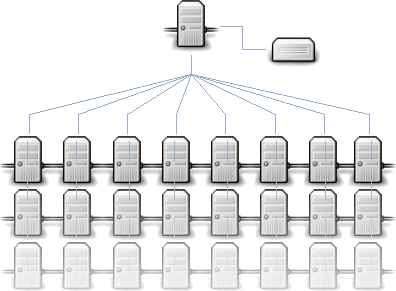
Network layout for a fully redundant fault tolerant stSoftware server cluster.

Overview
Best practice network design for a highly scalable, distributed web system has:-
-
- No single point of failure.
- Fault tolerant
- Servers are locked down
- Defence in depth
- Load balancing
- Lowest possible permissions/access for each component
- Health monitoring for each component
Network Layout Design
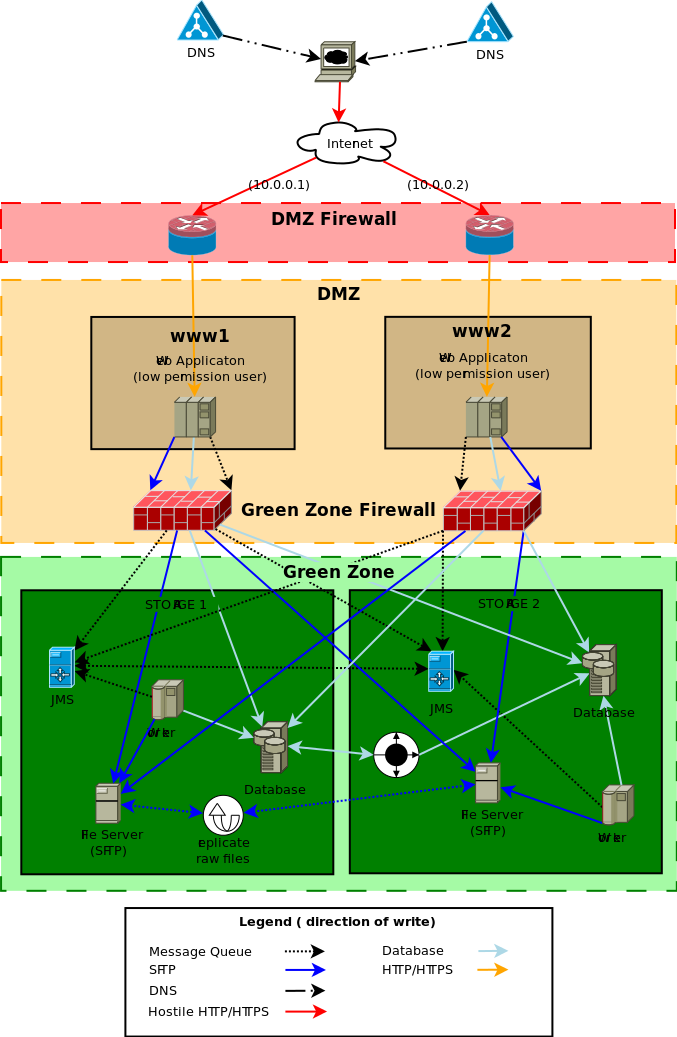
( source diagram)
DNS setup
The DNS for yoursite will have two (or more) IP addresses, one for each web server. This is known as a DNS round robin
We also define a direct access host name per server for health monitoring.
Example configuration for yoursite.com
-
- www1 -> 10.0.0.1
- www2 -> 10.0.0.2
- www -> 10.0.0.1, 10.0.0.2
Ideally the static IP of one server would be from one network provider and the other server IP would be from another network provider. This means we are not reliant on one network provider.
DMZ Firewall
The firewall only allows the ports HTTP & HTTPS (80 & 443) through to web servers in the DMZ, all other ports are closed.
The firewall is the first line of defence from a DOS attack the firewall will be configured to drop concurrent requests from one IP if a threshold is exceeded. We recommend 50 concurrent requests from one IP to be a reasonable limit. Given that one browser will only make 3 or 4 concurrent requests but users behind a proxy will be seen as one IP address. A limit of 50 allows for a staff meeting at your local Starbucks but still protect against a simple single node DOS attack.
See sample configuration of iptables to prevent DOS attacks.
We install the package “fail2ban” with a custom configuration script which monitors the web server access logs for well known hack attempts. When a hack attempt is detected the IP address of the hackers system is automatically blocked for 10 minutes.
Please note: The “fail2ban” module will need to be disabled when/if penetration testing (PENTEST) is being performed as the tester will be locked out as soon as they run a script looking for well known issues.
DMZ
Web server
The web server run by a low permissioned user "webapps". The DMZ firewall has redirected the high permissioned ports from HTTP/ HTTPS ( 80 & 443) to a low permissioned port for example 8080 & 8443. The low permissioned user "webapps" has a group of "nobody".
The web server can only access the data, files and message server through the "green zone firewall".
The servers in the DMZ do not store ANY client data or files. They can be restored from backup or completely rebuilt without the loss of any client data. The DMZ servers are considered "disposable", the web servers have as much CPU and cache as possible, and the disk space is only used for caching reasons.
All Linux servers are locked down to the best industry standard.
Recommended Specifications
-
- 300 gigs of disk space.
- 32 gigs of RAM
- 8 CPU cores
Green zone Firewall
The "green zone firewall" will be configured to open the database, message server ( port 61616) and SFTP (22 port) from the DMZ to the "green zone" storage servers.
Green zone
Storage Server
The storage servers is where the data is stored and must be backed up as regularly as possible, the disk drives must be as reliable as possible, the web servers cache the files as required so disk speed isn't a large concern.
JMS
The JMS servers are configured with failover transport with a bridged connection between the two JMS servers. The definition of the JMS server is entered into the aspc_master database in the table aspc_server.
Worker
The application worker process for all background events processing.
Database
The actual database storage. The database is set up with "Multi-master replication" with ZERO latency or in a traditional Master slave replication.
To date the only database tested and supported Multi-master replication is Oracle RAC. The system relies heavily on optimistic locking to handle multi-server bidding and processing, it is very important that the database is 100% ACID with no latency conditions. If the link between data centers goes down ( last remaining single point of failure) we need to take one of the data centres off line and then tell Oracle RAC not to sync. When the link between data centers is back up and running then we need to do a full backup restore to the database that was off line.
Our system relies heavily on the consistency of the database. We ask questions like "what is the next invoice number?" we can't have the same invoice number been given to two application servers no matter what. This is quite a complex task for multiple master database replication.
For other supported databases (Postgres,MSSQL or MySQL) a traditional Master-Slave database replication is supported. This configuration does mean that there is the need for manual intervention to swap from the master database to the slave database in case of outage.
Note: There are cheaper database solutions that claim multiple master replication but there is qualifiers around the word "ACID". If there is any qualifiers on the word ACID we don't support it.
File Server (SFTP)
All raw files which are compressed and encrypted are stored on a series of SFTP servers. The default file server which is defined in the aspc_master database in the table aspc_server table will be defined to have the connection details for both file servers. When a new file is uploaded to one of the web server, the web server tries to write to both file servers. As long as the write to one file server is successful then the client file upload is treated as successful.
There is a periodic task to sync any file that was successfully upload to one file server to the other. The system will automatically heal a file server that has a missing raw file as the missing files are discovered. This allows a file server to be recovered from backup as long as the redundant server has the full set of files since the backup being restored.
Recommended Specifications
-
-
- 2 TB of disk space.
- RAID 10
- 16 gigs of RAM
- 4 CPU cores
-